Windows preview · Omarchy widget · Source on GitHub
tally — windows
Actual Tally app · example data, no private sessions
Reads usage from
Claude
Codex
DeepSeek
llama.cpp
Claude Code
Codex CLI
OpenCode
pi · omp · dsh
Different tools. One working day.
A Claude Code session here. A Codex run there. OpenCode on another model, and a local server quietly using your GPU. Tally brings the usage scattered across those tools into one desktop view, so you can see where your tokens went and what your stack is doing.
Inside Tally
The numbers. And the context.
Start with the whole picture. Open a provider when you need the detail.
01 / Usage
Know where your tokens go.
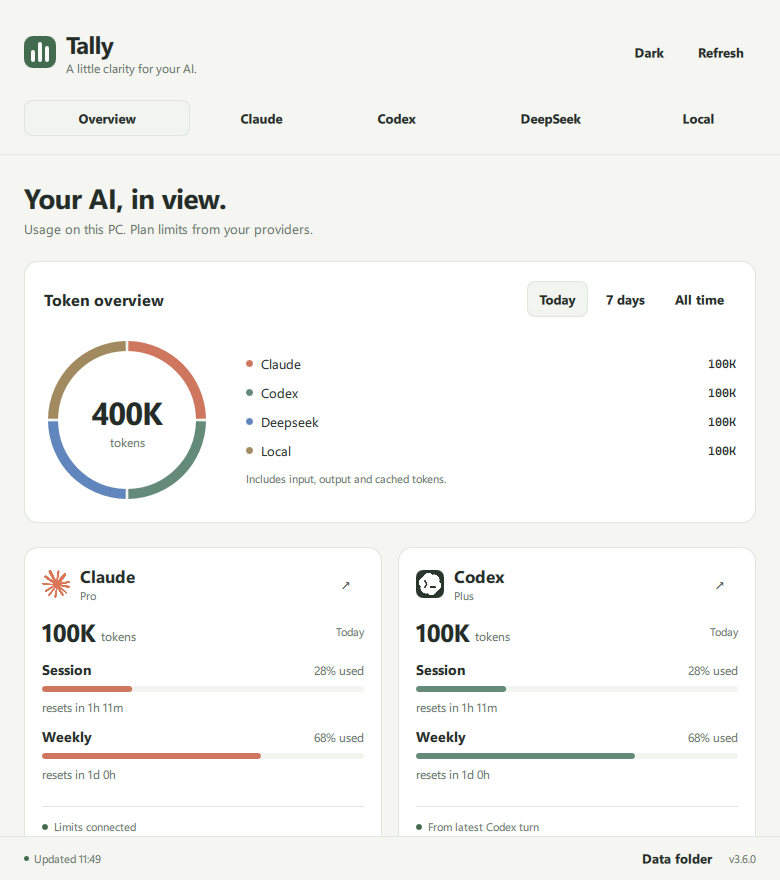
Today, the past seven days, or all time. See usage by provider, client and model, alongside sessions, answers and a 20-week activity grid.
Cloud usageTokens & plan limits
DeepSeekBalance & rate windows
Local inferencePerformance & controls
Session deduplication keeps resumed or forked answers from being counted twice.
Overview · actual app, example data
02 / Cloud
Keep your limits in view.
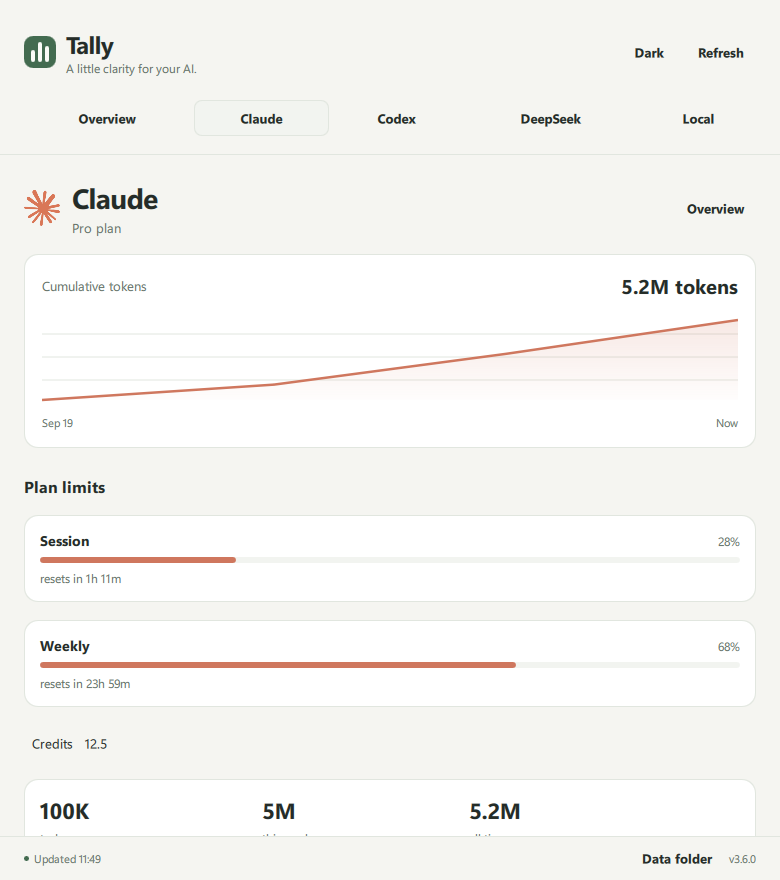
See Claude's available usage windows and the limits recorded by your latest Codex turn. Live activity adds the client, model and recent token pace.
DeepSeek brings in its prepaid balance and peak/off-peak rates. Configure your funded amount to see derived spending.
Availability depends on each provider's data and sign-in. Tally does not calculate a universal bill across providers.
Claude detail · actual app, example data
03 / Local
Your GPU. Your model. Your view.
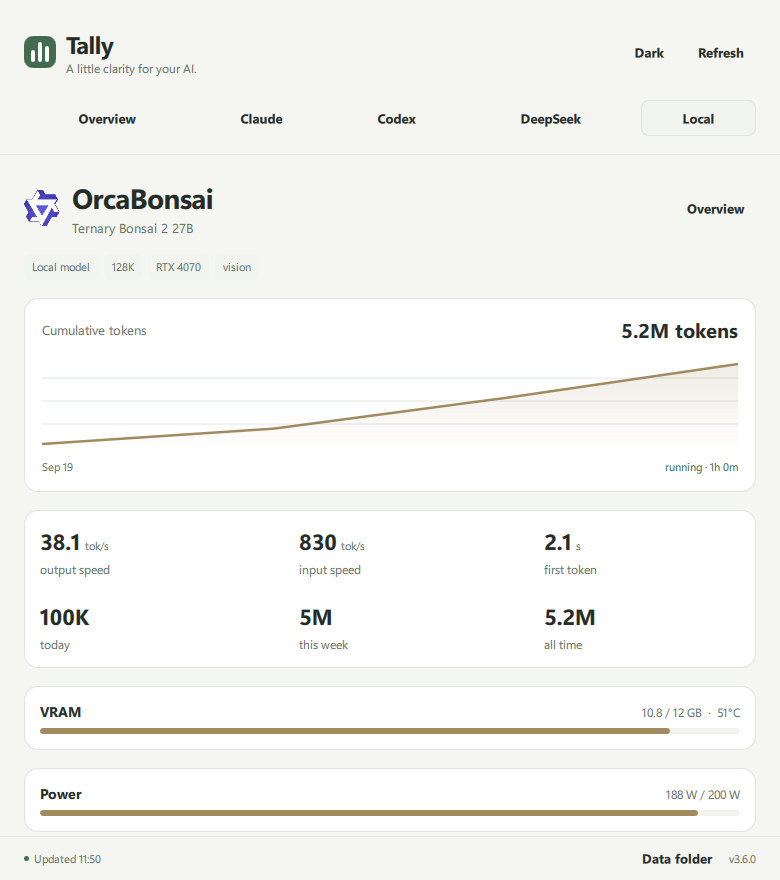
Follow llama.cpp generation and prompt speed, time to first token, and available NVIDIA GPU readings: VRAM, utilization, temperature and power.
Start or stop your configured server, adjust supported LoRA scales, and open an agent in the folder you choose.
Requires a compatible llama.cpp server and log configuration. GPU readings depend on hardware and drivers.
Local inference · actual app, example data
Local-first, by design
A view on your machine. Close to your work.
Tally reads supported session histories and server logs on your computer. Usage accounting and its caches stay there; no Tally-hosted account or ingestion service is required.
Online readings connect directly to provider APIs: Claude for usage limits and DeepSeek for balance. The local model view talks to your configured server.
No Tally accountNothing to sign up for.
No ingestion serviceHistories are read where they live.
No app analyticsThe desktop app has no analytics integration.
This website has no analytics scripts, contact forms or tracking cookies. Cloudflare still processes ordinary web requests.
How it counts
Honest numbers, or none.
null
Absent is not zero
A reading Tally can't get stays unknown. A source that cannot be read shows as an error, never as a quiet zero.
1×
Each answer, once
Resumed and forked sessions are deduplicated, so the same answer is not counted twice.
≠
Usage apart from limits
Transcript totals are tracked separately from live plan limits. If a limits sign-in expires, local totals stay in place and no zero is invented.
Fits the tools you use
Providers meet clients.
The model provider and the tool you use to reach it are different things. Tally keeps both in view.
Providers
Usage and available provider readings
ClaudeUsage & plan limits
CodexUsage & recorded limits
DeepSeekUsage, balance & rates
Local llama.cppUsage & inference metrics
Session readers
Local histories from supported coding tools
Claude CodeTranscripts
Codex CLIRollouts
OpenCodeSessions
pi · omp · dshSessions
Coverage follows supported history formats and provider attribution. DeepSeek through a third-party gateway is not attributed to a direct DeepSeek balance. Provider and client names identify compatible tools only.
Independent · in active development
Small tool. Clear purpose.
Tally is an early-stage project built under the Mochidock name. A working Windows portable preview and the original Omarchy widget are implemented. The source is available on GitHub, with setup guides for both versions. Packaged public releases are not available yet.
The development build runs on Windows 10/11 x64, with a portable tray app and light/dark dashboard. The original Linux widget runs within Omarchy. You can build from the source using the Windows setup guide in the repository. Distribution and setup are still being refined.
Does Tally need my prompts?
The session readers inspect local history files for usage, model and session information. They do not upload those files to a Tally service. Provider readings may need an existing sign-in or API key.
Can it show every provider's exact cost?
Current cost information is specific to DeepSeek: prepaid balance, displayed rates and derived spending when a funded amount is configured. Other providers show supported usage and limit data.
Is Tally affiliated with the providers?
Tally is an independent project. Provider and client names identify compatible tools; they do not imply endorsement or partnership.